




Recommended Software
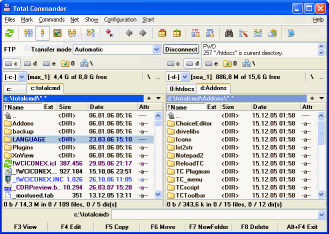
Total Commander 7.01
Total Commander (former Wincmd) is an Explorer replacement for Windows. This is the 32 bit version for Windows 9x, ME, NT, 2000, and XP. A 16 bit version is also available as tc16v656.zip. Total Commander handles archives like subdirectories. It supports...
DOWNLOADSoftware Catalog
 Android Android |
Business & Productivity Tools |
| Desktop |
Developer Tools |
| Drivers |
Education |
| Games |
Home & Personal |
| Internet & Networking |
Multimedia & Design |
| Operating Systems |
Utilities |


PowerISO
PowerISO 4.0
Category:
Utilities / Backup
| Author: PowerISO Computing, Inc.
DOWNLOAD
GET FULL VER
Cost: $29.95 USD
License: Shareware
Size: 1.1 MB
Download Counter: 70
With PowerISO, you can:
1. Open and extract ISO File.
2. Create ISO file from hard disk files or CD/DVD-ROM.
3. Edit an existing ISO file directly.
4. Convert image files between ISO/BIN and other formats. PowerISO can convert almost all image file formats to a standard ISO format file.
5. Make bootable ISO file, get boot information from bootable ISO file.
6. Make floppy disk image file.
7. Optimize files to save disk space while saving ISO file.
8. Mount ISO file with internal virtual drive. You don't need install any other virtual drive software.
9. Compress, encrypt or split image file. DAA(Direct-Access-Archive) is an advanced format for image file, which supports some advanced features, such as compression, password protection, and splitting to multiple volumes. It can be handled directly just like other formats, such as ISO, BIN, ...
OS Support:
Language Support:
Related Software
Add Virtual Drive | Bootable Cd | Cd Image File | Compress Image | Compress Iso | Create Iso | Edit Iso | Encrypt Hard Drive | Encrypt Iso | Extract Iso | Mount Iso | Open Iso | Virtual Drive | Virtual drive 5 | Virtual Drive 8 | Virtual Drive 9 | Virtual Drive Pro | Virtual drive r | Virtual k drive
 WinISO - WinISO is the world's first ISO image editing software for all BIN and ISO needs. It can not only convert between ISO and other formats, but also extract, edit, mount,burn and create ISO files directly. Meanwhile, it can create and edit bootable CDs.
 WinArchiver - WinArchiver is a powerful archive utility, which can open, create, and manage archive files. It can process almost all archive formats, including zip, rar, 7z, iso, and other popular formats. WinArchiver can also mount the archive to a virtual drive.
 UltraISO Premium - Extract, edit, create and burn ISO/BIN files directly, make bootable CDs, and convert more than 27 CD/DVD image formats to ISO, BIN/CUE, Nero (.NRG) or CloneCD (.CCD/.IMG/.SUB) format. It can make image from CD/DVD-ROM, and handle disk image as well.
 gBurner - gBurner is a CD/DVD burning tool, which can create and burn data/audio CDs and DVDs, make bootable data CDs and DVDs, create multisession discs. gBurner is also a disc image file processing tool, which can extract, edit, and burn iso image files.
 ISOEdit - ISOEdit is an Powerful editor for CD-ROM/DVD image file.Can create add delete rename extract ISO image file.Also create ISO image file from CD/DVD-ROM,make bootable CD
 WinMount - WinMount is a compression tool, also a virtual disk tool ( Mount RAR ZIP MOU and CD DVD HDD images as virtual disk/folder ). Supported formats: MOU ZIP RAR 7Z CAB ARJ ISO GZ BZ2 TAR WIM VHD VDI VMDK ISO ISZ BIN MDS MDF NRG IMG CCD CUE APE FLAC WV.
 Phantom Burner - Phantom Burner is a virtual Blu-ray BD-RE/DVD+RW/CD-R burner drive. It allows you create BD/DVD/CD disc image files from any disc burning software, and mount them later as BD-ROM/DVD-ROM and CD-ROM. It supports virtual data CD and audio CD.
 MagicDisc Virtual DVD/CD-ROM - MagicDisc can create virtual CD and DVD, Mount ISO image and CD/DVD images as virtual DVD or CD. Encrypts ISO image and Compresses ISO image and CD/DVD image,Make CD/DVD image from CD/DVD.Supports up to 15 virtual drivers.Universal Image Format(UIF)
 R-Drive Image - Drive image and backup software to create exact image of a hard drive, partition or logical disk. Drive image files can be created with various compression levels without stopping Windows and stored in a variety of places, including removable media.
 CryptoExpert 2007 Professional - CryptoExpert creates new virtual hard drives that appears to applications like any other physical hard drive. Any data that the user attempts to write to this drive is intercepted and encrypted by CryptoExpert. Drive is invisible without password.
 Top Downloads
- 1Click DVD Copy
- CloudBerry Explorer for Amazon S3
- USB Drive Files Recovery software
- Zilla CD-DVD Rip N' Burn
- PowerISO
- R-Drive Image
- Recovery Mechanic
- Advanced CheckSum Verifier
- File Uneraser
- Handy Backup

New Downloads
- Syncios
- Data Recovery Software
- Digital Photo Recovery
- USB Drive Data Recovery
- Dvd Shrink
- Ocster Backup Pro
- Burn4Free
- File Uneraser
- Z-DATdump
- Recovery Mechanic

New Reviews
- jZip Review
- License4J Review
- USB Secure Review
- iTestBot Review
- AbsoluteTelnet Telnet / SSH Client Review
- conaito VoIP SDK ActiveX Review
- conaito PPT2SWF SDK Review
- FastPictureViewer Review
- Ashkon MP3 Tag Editor Review
- Video Mobile Converter Review
Actual Software
| Link To Us
| Links
| Contact
Must Have
| TOP 100
| Authors
| Reviews
| RSS
| Submit


