




Recommended Software
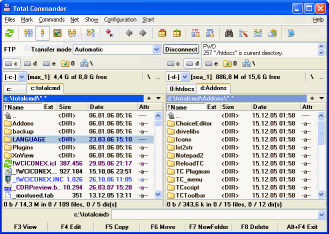
Total Commander 7.01
Total Commander (former Wincmd) is an Explorer replacement for Windows. This is the 32 bit version for Windows 9x, ME, NT, 2000, and XP. A 16 bit version is also available as tc16v656.zip. Total Commander handles archives like subdirectories. It supports...
DOWNLOADSoftware Catalog
 Android Android |
Business & Productivity Tools |
| Desktop |
Developer Tools |
| Drivers |
Education |
| Games |
Home & Personal |
| Internet & Networking |
Multimedia & Design |
| Operating Systems |
Utilities |


Energy Spy
Energy Spy 1.8
Category:
Utilities / Launchers
| Author: FlexibleSoft Co.
DOWNLOAD
GET FULL VER
Cost: $24.97 USD, 250.00 RUB
License: Shareware
Size: 1.4 MB
Download Counter: 10
We have created such aid for you - it's Energy Spy. The program controls the computer's power according to your schedule. You can restart the computer, leave it on standby or turn it off using a schedule you create beforehand, hot keys or the command line. The program interface is fully compatible with Windows XP. Besides, Energy Spy can adjust the system time of your computer using numerous exact-time servers in the Internet and manage CD drives trays - using hot keys or a menu - or eject a CD/DVD disk you have forgotten in the drive after Windows shuts down.
Main features of Energy Spy:
- Turning off the computer, restarting it, etc. according to a previously created schedule.
- Support of "Socks v5", "Socks v4" and "Socks v4A" proxy servers for time synchronization protocol.
- Automatic opening of CD drive tray when the power is switched off (only if there is a disk in the drive).
- A feature of hiding the program in the notification area to leave free space on your desktop.
- A feature of adjusting system time of your PC using numerous exact time servers in the Internet.
- Automatic selection of the fastest server.
- Multithread synchronization. The program addresses to several servers at a time and automatically selects the best one.
- A feature of using sound alarm.
- A feature of automatic launching on OS startup.
- Simple interface and intuitive settings.
- Support of Windows XP skins.
- A feature of assigning hot keys for managing the power and opening/closing the tray of CD/DVD drive.
- All power management operations can be performed using the command line parameters.
Requirements: NONE
OS Support:
Language Support:
Related Software
Apm | Autoit logoff | Cd | Computer Hibernate | Delay logoff | Hibernate | Hibernate fix | Logoff | Logoff hot key | Logoff wave | Monitor | Monitor standby | Off | Power | Power scheduler | Reboot | Scheduler | Shutdown | Shutdown reboot | Wsh hibernate
 Manage PC Shutdown - Help you to manage shutdown, log off, reboot, lock, power off, hibernate, disconnect from the Internet/network, or go into standby mode in Windows, both manually and automatically.
 AbsoluteControl - AbsoluteControl(tm) offers wide range of OS control tools available on single click. It can set your screen resolution with highest possible refresh rate, open\close your CD drives, reboot, shutdown and poweroff your system & web-search.
FREEWARE!
AbsoluteControl - AbsoluteControl(tm) offers wide range of OS control tools available on single click. It can set your screen resolution with highest possible refresh rate, open\close your CD drives, reboot, shutdown and poweroff your system & web-search.
FREEWARE!- AutoShutter - Automatically set your PC on when to shutdown, Restart, Standby or Hibernate...etc
 PC Auto Shutdown - PC Auto Shutdown is a handy utility that helps you shutdown, power off, reboot, hibernate, suspend or log off computers at schedule time you specifies. It gives you different ways to schedule the shutdown event, such as daily, weekly and only once.
 ShutDownOne Home - Automatically Restart, ShutDown, Power Off, Hibernate, Standby at defined time. Password Settings Protection. Privacy Control: IE history, cookies, typed URLs and more. Scheduled operation, Hot Key
and more...
ShutDownOne Home - Automatically Restart, ShutDown, Power Off, Hibernate, Standby at defined time. Password Settings Protection. Privacy Control: IE history, cookies, typed URLs and more. Scheduled operation, Hot Key
and more... Auto Power-on Shut-down - An easy to use application that allows you to control your computer resume from power-off state (hibernation) or wake up your computer from sleep mode (stand by).
 RebootEx - Advanced system utility for Windows NT/2000/XP operating systems that allows you to automatically shutdown, power off, remotely shut down, shutdown at a specific time, reboot and/or relogon to your computer.
 PowrClik Suite - StandBy / Hibernate / Wake Up / Lock / Log Off / Restart / Power Off / Disconnect computer / Turn off monitor / Run file / Prevent suspend or shut down (+ much more) immediately (by click or command line) or scheduled (by timer, event or script).
 Turn Off Monitor - Turn Off Monitor is a Utility by which you can Turn Monitor Off using either a shortcut Key or a shortcut or an Icon in System Tray during music download.Hibernate and Schedule WakeUp and many more features.Register for $5.00 and get Free Upgrades.
 PC Power Partner - Now you can conserve energy and save money by using PC Power Partner to manage your computer’s energy usage. With PC Power Partner, you can schedule times for your computer to shut down, hibernate, or go into standby mode.
 Top Downloads
- Actual Multiple Monitors
- Auto Power-on Shut-down
- Launcher
- Schedule
- MuvEnum Address Bar
- Chameleon Startup Manager Pro
- Classic Start Menu
- DE Launcher
- FireDaemon Pro
- Krento

New Downloads
- Launcher
- Kybernet
- Automize
- Chameleon Startup Manager Pro
- NotRun
- Actual Multiple Monitors
- AutoRun Architect
- Auto Power-on Shut-down
- Classic Start Menu
- TrayIcon Pro

New Reviews
- jZip Review
- License4J Review
- USB Secure Review
- iTestBot Review
- AbsoluteTelnet Telnet / SSH Client Review
- conaito VoIP SDK ActiveX Review
- conaito PPT2SWF SDK Review
- FastPictureViewer Review
- Ashkon MP3 Tag Editor Review
- Video Mobile Converter Review
Actual Software
| Link To Us
| Links
| Contact
Must Have
| TOP 100
| Authors
| Reviews
| RSS
| Submit


