




Recommended Software
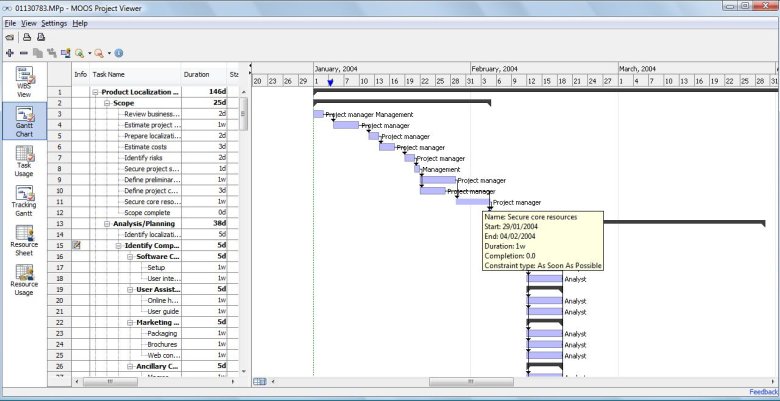
MS Project Viewer 2.8
MOOS Project Viewer is a Microsoft Project viewer that can open any MS Project file type (.mpp, .mpt, .mpx, .xml) for any Microsoft Project version (2000, 2003, 2007, 2010). Available views: WBS, Gantt chart, task sheet, resource sheet, resource usage, tracking Gantt. It is running on any Java...
DOWNLOADSoftware Catalog
 Android Android |
Business & Productivity Tools |
| Desktop |
Developer Tools |
| Drivers |
Education |
| Games |
Home & Personal |
| Internet & Networking |
Multimedia & Design |
| Operating Systems |
Utilities |


Add Contacts Feedback System
Add Contacts Info
License: Shareware | Author: MAPILab Ltd. | Requirements: Microsoft Outlook 2000/XP/2003/2007/2010 (32 and 64-bit)
Add Contacts automatically adds e-mail addresses to the contacts folder when you reply to a message and/or send a new message. This will help you avoid losing addresses of people you correspond with. Moreover, the collected addresses can be used for mail filtering. For example, you can use the Rule Wizard to have messages from certain senders (whose addresses are in the address book) placed in a separate folder to ensure that their message will be dealt with greater priority and no important messages will be lost with deleted spam. Some spam filters also check the contact folder to rule out erratic responses to recognised senders. When a contact is being created, the add-in attempts to detect the name corresponding to the e-mail address automatically. So, if you have received a message from the address "John Smith" [[email protected]], the new contact created by the program will be named John Smith. However, if name detection fails, the add-in attempts to retrieve it from the message body itself. For example, if your message begins with the string "Dear John, :", the program will automatically extract the name from the greeting and create a contact named John. You can disable automatic name detection in the program settings. You can also enable the option - category assigning of created contacts. If a category is assigned to a message while sending, the same category will be assigned to the created contact. You can choose any folder as the contact destination, either in your personal mailbox or in public folders on Microsoft Exchange server. When adding a contact, Add Contacts checks the folder for possible duplicates. In the program settings, you can also instruct Add Contacts to search for contact duplicates, over all contact folders in your personal mailbox besides the specific destination folder. Designed for Microsoft Outlook 2000, 2002/XP, 2003, 2007 and 2010.
Notice: * - required fields
MAPILab Ltd. Software
 Actual Contacts for Outlook - Actual Contacts for Outlook is a Microsoft Outlook add-in for validating and updating your address book. Select contacts and ACO will send them a message containing a form. E-mail addresses in your Outlook can be verified with just a few mouse clicks
 Advanced Folders Watch - Monitors new mail messages and posts appearing in Microsoft Outook folders and public folders on Microsoft Exchange Server. A wide set of filters, passive and/or active user notifications. Works as an add-in to Microsoft Outlook 2000/XP/2003/2007.
 Attachments Processor for Outlook - The program can automatically extract attachments from incoming messages to save them to disk (they are replaced with a link to the file or with a text description), unpack archived attachments, and pack attachments in the outgoing messages.
 Contacts Verifier - Contacts Verifier is the Microsoft Outlook add-in designed to monitor the validity of email addresses. It is able to check your contacts throughout in a few minutes and notify you of contacts that contain invalid email addresses.
 Duplicate Email Remover - Delete duplicate emails and posts in Outlook and Microsoft Exchange Server folders; search across your folders. A duplicate found can also be marked, copied or moved to any other folder. Works as an add-in for Microsoft Outlook 2000-2010. Free trial.
 Duplicates Remover for Outlook - Delete duplicate contacts, notes, tasks, etc. in Microsoft Outlook; searching across folders. A duplicate found can be marked, copied or moved to any folder. Works as an add-in for Microsoft Outlook 2000, 2002/XP, 2003, 2007 and 2010 (32 and 64-bit).
 Easy Survey - Software for Microsoft Office, designed for survey creation and conducting. Uses the possibilities of Access for survey form creation and Outlook to send questionnaires and process respondent's answers. Results are stored on a Access table.
 Mail Recovery for Outlook Express - Recover deleted messages and mail from damaged folders and dbx files in Outlook Express. Searching across the several folders. A recovered message could be saved to email folder or text eml file.
 MAPILab File Recovery for Office - Effective document recovery tool for Microsoft Word, Excel, PowerPoint, Visio and many other popular formats. MAPILab File Recovery can recover documents lost due to computer crashes, accidental deletion - even if the Recycle Bin has been emptied.
 MAPILab Groupware Server - MAPILab Groupware Server is a cost effective alternative to the traditional methods of Outlook sharing. It allows you to easily share contact details, message folders and more over your network without requiring Microsoft Exchange Server.
 Top Downloads
- The Bat!
- Auto Mail Sender
- Gammadyne Mailer
- Gmail Account Creator
- R-Mail for Outlook
- ABCSpell for Outlook Express
- Advanced Mass Sender Enterprise
- GYC Automator
- Email Spider
- GSA Email Spider

New Downloads
- DetachPipe
- Gammadyne Mailer
- SmartSerialMail
- Fast Mailer Pro
- Atomic Subscription Manager
- Bulk Email mailer
- Atomic Email Hunter
- Atomic Email Autoresponder
- Atomic Whois Explorer
- Atomic Mail Verifier

New Reviews
- jZip Review
- License4J Review
- USB Secure Review
- iTestBot Review
- AbsoluteTelnet Telnet / SSH Client Review
- conaito VoIP SDK ActiveX Review
- conaito PPT2SWF SDK Review
- FastPictureViewer Review
- Ashkon MP3 Tag Editor Review
- Video Mobile Converter Review
Actual Software
| Link To Us
| Links
| Contact
Must Have
| TOP 100
| Authors
| Reviews
| RSS
| Submit


