




Recommended Software
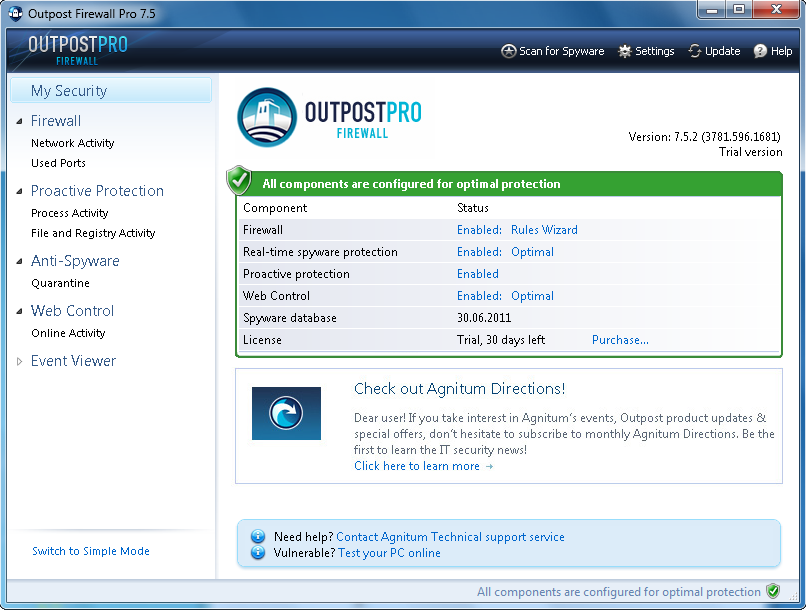
Agnitum Outpost Firewall Pro 7.5.1
PC defense against hackers, malware, viruses and Internet attacks. Inbound and outbound system and application firewall delivers powerful protection against a wide range of threats from local networks and the Internet and prevents unauthorized access to your PC. Protection for your OS and...
DOWNLOADSoftware Catalog
 Android Android |
Business & Productivity Tools |
| Desktop |
Developer Tools |
| Drivers |
Education |
| Games |
Home & Personal |
| Internet & Networking |
Multimedia & Design |
| Operating Systems |
Utilities |


MultiSchedule
MultiSchedule 1.3.0.0
Category:
Home & Personal / Clocks, Calendars & Planners
| Author: ATX NV/SA
DOWNLOAD
Cost: $29.00 USD, 29.00 EUR
License: Shareware
Size: 3.1 MB
Download Counter: 4
MultiSchedule is a calendar software application that can be used on a network or on just one computer. Multiple users can use multiple computers to input/view/edit calendar events simultaneously in real time. All data are stored on a central server/computer. No dedicated server/computer is needed. The client side software can coexist with the server side software on one computer. It works for both Peer-to-Peer network and Client/Server network.
Connect to the calendar server through Internet
If you have a server that is accessible over the Internet, MultiSchedule will be able to connect to the server over the Internet! We recommend that you use a DSL/ADSL or Cable modem to connect to the server if you are connecting to it over Internet to get the best result. If you don't have a server you can use the "Hosted" version of MultiSchedule and we will take care of your database on our servers which have a super fast connection. This way you don't have to bother about your calendar data, you will be able to access it on every computer that has Internet access.
Synchronize with MS Outlook
MultiSchedule is able to do two-way synchronization with MS Outlook. This way you can synchronize your calendar with your MS Outlook, without having to buy an extremely expensive MS Exchange Server. From MS Outlook you can Sync again to your PDA with your standard PDA-sync-software.
Custom appointment / task properties
Customizable appointment / task properties. Set up your own appointment and task properties. You can organize your appointments with these custom properties. For example: You add a custom field Invoiced or Paid to your calendar-items. This way you can check if an appointment has been paid for or has been invoiced already.
OS Support:
Language Support:
Related Software
Calendar | Calendar Group Outlook | Calendar Outlook Share | Exchange Alternative | K-plan software | Multi Schedule | Multiple | Networking | Networking Software | Outlook Calendar | Outlook Calendar Share | Outlook Calendar Sharing | Plan | Planner | Pocket Outlook Calendar | Schedule Planner | Shareware | Software | Synchronize Outlook
 Multi Project Planner - Multi-Project-Planner contains a global plan representing the schedules of the organization. Upon this plan the gantt charts of the projects are superimposed. This layout immediately reveals resource conflicts among the activities.
 My Schedule - Printable calendar, reminder, planner and intuitive scheduler will help you to plan your events on a daily, weekly, monthly, or yearly basis. No more missed dates - get reminder or print the calendar! US holidays. Free download & technical support.
 Employee Planner - A planner software which plans staff & employee event, travel, trip, vacation, schedule, work, project, meeting, daily work with Intuitive Chart, Networking Access, Task related Planning, Password Protection, Drag-And-Drop & Export to word/excel...
 Visual Day Planner - Fully customizable network capable calendar that allows real-time updates by workgroup users. Powerful network features allow users to synchronize and view everyone??™s activities in real-time.
 OLCalendarSync - With OLCalendarSync you can synchronize any Outlook-Calendar with other people. The synchronization works in the background through your e-mail ??“ allowing synchronizing appointments easily over the net.
- Visual Calendar Planner - Organize your day visually with this calendar which has customizable fonts, colors and 3D text. It allows a fast and easy way to schedule appointments with monthly or weekly displays.
 ShareO for Outlook - Share Outlook folders without server. Microsoft Outlook add-in for synchronizing and sharing Outlook folders, sharing PST, sharing email, sharing calendar without Exchange. Share calendar, share Outlook contacts, sync Outlook contacts, address book.
- OfficeCalendar for Microsoft Outlook - Share Microsoft Outlook calendar, contact, and task information with this affordable Exchange alternative. Makes Outlook calendar sharing and Outlook group calendar scheduling easy. Works with Microsoft Outlook 2000, XP, and 2003. Free trial.
 Monkeymen Calendar - Customize this intuitive Desktop Calendar Reminder Software with your own photos and virtual stickers. Plan on a daily, weekly or monthly basis. Never forget birthdays or appointments. Includes a handy to-do list. Create printable desktop calendars.
 VPSpro - The VPSpro is an award winning step-by-step business plan software system, which guides entrepreneurs confidentially through the research of their project on-line and helps them analyse the feasibility of their business idea or expansion.
 Top Downloads
- Floating Clock
- Speed Up Alarm
- Countdown
- Aml Pages
- Marxio Timer
- TimeLeft
- MP3 PC Alarm Clock
- Dynamic Notes
- 7art Aquarius Clock ScreenSaver
- Ace Clock XP

New Downloads
- Aml Pages
- TimeBell
- Dynamic Notes
- ReMind
- Clock Tray Skins
- Atomic Alarm Clock
- AutoShutter
- SNV Timer
- TimeLeft
- GrizeR

New Reviews
- jZip Review
- License4J Review
- USB Secure Review
- iTestBot Review
- AbsoluteTelnet Telnet / SSH Client Review
- conaito VoIP SDK ActiveX Review
- conaito PPT2SWF SDK Review
- FastPictureViewer Review
- Ashkon MP3 Tag Editor Review
- Video Mobile Converter Review
Actual Software
| Link To Us
| Links
| Contact
Must Have
| TOP 100
| Authors
| Reviews
| RSS
| Submit


