




Recommended Software
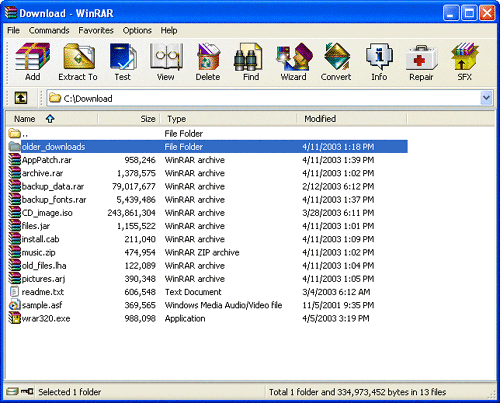
WinRAR 3.90
WinRAR is a 32-bit/64-bit Windows version of RAR Archiver, the powerful archiver and archive manager. WinRARs main features are very strong general and multimedia compression, solid compression, archive protection from damage, processing of ZIP and other non-RAR archives, scanning archives for...
DOWNLOADSoftware Catalog
 Android Android |
Business & Productivity Tools |
| Desktop |
Developer Tools |
| Drivers |
Education |
| Games |
Home & Personal |
| Internet & Networking |
Multimedia & Design |
| Operating Systems |
Utilities |


EF Multi File Renamer
EF Multi File Renamer 1.40


Category:
Utilities / File & Disk Management
| Author: EFSoftware
DOWNLOAD
GET FULL VER
Cost: $14.00 USD, 11.90 EUR
License: Shareware
Size: 2.1 MB
Download Counter: 4
Select the rule(s) you need for the current task from an extensive set of predefined rules. Each rule has its individual settings. Renaming tasks can be implemented clearly with a minimum of efforts.
Complex tasks can combine more rules in the desired order as well as several times. The integrated real time preview shows each change of parameters immediately,
Defined rules set can be stored and later load. The possibility to deactivate individual rules increase the flexibility and function variety. Rules position in a set can be changed with ease.
Here are some key features of EF Multi File Renamer:
* The Windows Explorer like interface offers an optimal overview on the entries.
* Clear, easily understandable definition from simple to complex renaming rules with a multiplicity of options. Rule sets can be stored and loaded later again.
* Complete real time preview of the new file names before renaming including error recognition with name conflicts.
* Undo the last renaming operation.
* Recursive processing of subfolders and the files contained in it.
* Filter function for the restriction of the files on the basis of various criteria.
* Integration of external description Plugins in the WDX format written by third parties.
* Export of file lists in different formats.
Multilingual.
Shareware, FREE Updates.
Requirements: Typical Windows Installation
OS Support:
Language Support:
Related Software
Batch File Rename | Batch File Rename Utilit | Efmr | Efsoftware | Exif Rename | File Batch Rename | File Multiple Rename | File Rename | File rename 1.6 | File rename mp3 | File Rename Software | File rename vb | File Renamer | Mass File Rename | Mp3 Rename | Rename dos file | Rename Files
 RenameMaestro - Instantly batch rename files and folders. Rename multiple files using mp3 and photo tags, numbers, dates, letters and more with this batch file renamer. The instant preview in this batch file rename utility lets you bulk rename quickly. Free trial.
 Fast Photo Renamer - If you are not happy about such names of your photo files as "Img_0275.jpg", "Dsc00403.jpg", you need a tool to solve this problem - it is Fast Photo Renamer. You can rename either each photo separately or all photos in a folder at once.
 Quick File Rename Personal Edition - Very easy to use batch file and folder renaming utility, with INTERNATIONAL CHARACTER SUPPORT! Features such as Undo, Real-time Preview, DOS 8.3 file convert, file rename using wildcards, file mask, regular expressions, MP3 id3 tagging and MANY more.
 Fast Folder Rename - Fast Folder Rename allows you to rename multiple folders at once (first of its kind!) just by dragging and dropping from an explorer window. Options include changing of first letter to uppercase, all letters to uppercase/lowercase and more!
 NameWiz - NameWiz rename files and a batch file renaming tool. A powerful interface with an advanced file renaming utility. Select any group of files / folders and do what you want. Any files or folders can be renamed, no restrictions
 A Better Finder Rename - A Better Finder Rename is a contextual menu plugin for the Macintosh Finder, which allows users to quickly rename multiple files.
 MagiName - A tool to rename photo file, rename photo, rename photos, batch photo rename, batch rename photo, digital camera software, rename digital photo files, digital photo software, file rename, rename digital camera photo files, photo album.
 File Renamer - File Renamer is a bulk renaming tool on Mac to rename your thousands of files in few clicks with more than 40 possible renaming rules. Easy to use and powerful user interface with built in preview to see new names before you apply changes.
 Visual Renamer - Visual Renamer is unique batch renaming tool. Apart from common features of batch renaming, it can rename karaoke files, supports THM, EXIF, MP3 tags, and has lots of different filters to sort out files. You can also create your own custom scripts.
- EZ Photo Renamer - Rename digital photo files (eg DSC00001.jpg) generated by digital cameras. New file names can include same prefix, counters and creationg date. It's a must-have software to organize your digital photo files.
 Top Downloads
- Total Commander
- WinBin2Iso
- Hard Drive Mechanic
- WinMount
- Export Lotus Notes Address Book
- Notes to Outlook
- Secure File Vault
- EASEUS Partition Manager
- Drive Discovery
- BootIt Next Generation

New Downloads
- WinNc
- DiskSavvy Server
- Undela
- RescuePRO
- Hard Drive Mechanic
- Active SMART
- WinISO
- Outlook Recovery
- FlashPhoenix Photo Recovery
- Recovery For SQL Server

New Reviews
- jZip Review
- License4J Review
- USB Secure Review
- iTestBot Review
- AbsoluteTelnet Telnet / SSH Client Review
- conaito VoIP SDK ActiveX Review
- conaito PPT2SWF SDK Review
- FastPictureViewer Review
- Ashkon MP3 Tag Editor Review
- Video Mobile Converter Review
Actual Software
| Link To Us
| Links
| Contact
Must Have
| TOP 100
| Authors
| Reviews
| RSS
| Submit


