




Recommended Software
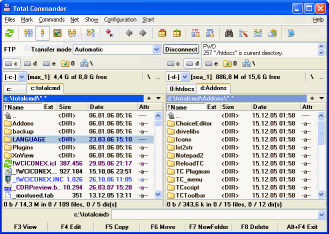
Total Commander 7.01
Total Commander (former Wincmd) is an Explorer replacement for Windows. This is the 32 bit version for Windows 9x, ME, NT, 2000, and XP. A 16 bit version is also available as tc16v656.zip. Total Commander handles archives like subdirectories. It supports...
DOWNLOADSoftware Catalog
 Android Android |
Business & Productivity Tools |
| Desktop |
Developer Tools |
| Drivers |
Education |
| Games |
Home & Personal |
| Internet & Networking |
Multimedia & Design |
| Operating Systems |
Utilities |


Dr.Explain Download
Dr.Explain 2.5.93
Dr.Explain is a help authoring tool for rapid creation of help files and user guides. Using its unique auto capture and annotation technology, developers can document their software interfaces almost hands down. When set to work, Dr.Explain parses a live application and automatically produces screenshots of its windows along with a sequence of callouts for each window control. Users only have to add some description to each callout as needed. Dr.Explain can output the results as a set of HTML pages, CHM help file or RTF document complete with screenshots, cross-references, menus and an index page. The output is accurate and professional.
Dr.Explain is ideal for software developers, ISV, micro ISV and technical writers. It handles all the complexities of help formatting and generation, allowing them to concentrate on pure writing. This saves them days that would otherwise be wasted. Dr.Explain is also great to keep help documentation in sync with software updates. Since all data is stored in a single source file, developers can easily edit or update any portion of an existing file. In doing this, they are not required to rearrange the entire help or generate a new file. Developers will also benefit from the opportunity to customize the appearance of their help file to make it match their corporate style. They can customize its visual elements, menus and page layout. On top of all this is an affordable price, which is lower than with the majority of other software documentation tools.
Size: 7.4 MB | Download Counter: 2
If Dr.Explain download does not start please click this:
Can't download? Please inform us.
Related Software
 !Quick Screenshot Maker - Quick Screenshot Maker is an excellent tool for screen capturing, screen shot editing. It can capture screenshot and directly send it to the current canvas, also, it can Edit several captures in one screenshot project.
 AT Screen Thief - Screen capture. Screen Editor. Screenshot depository. Zoom. Hunter. Support of printing and saving in BMP, JPG, GIF, PNG.
 ScreenShot - Hit your Print Screen key and ScreenShot will save, modify, email, copy to clipboard, print and display your present screen. It is easy to use and even provides you with complete automation for each process. No nag-screens, includes cursor capturing.
 Easy Screenshot - Easy ScreenShot is award winning screen capture software that captures any part of your computer screen. Great screen capture utility for viewing, capturing, editing and printing images to manuals, presentations, help files and web pages.
 Grabilla - How to take a screenshot or screencast in one click? You don't have to use complicated programs, just run this simple application to capture a screen picture or even video with single click and share it with friends. Simple as 1-2-3.
 WinCHM - help authoring software - Help authoring software. Create Help file, Create Web-based help, Create CHM file, Create printable pages,
Create PDF manual easily and quickly.
Two versions: WinCHM Pro and WinCHM (Standard)
WinCHM - help authoring software - Help authoring software. Create Help file, Create Web-based help, Create CHM file, Create printable pages,
Create PDF manual easily and quickly.
Two versions: WinCHM Pro and WinCHM (Standard) Super Screen Capture - Super Screen Capture is an all-in-one software for screen capture. You can capture screen in many ways, including full screen capture, region capture, window capture, scroll capture, directx capture, video screen capture, sound record and etc.
 Screen VidShot - Capture desktop and windows to AVI video presentation! Screen VidShot allows you to record screen to video AVI, ASF, WMV. Using our video capturing technology you can record mouse movement and any changes to any to any application on your desktop!
 Screenshot Utility - Screenshot Utility is a screen capture program. It resides in the system tray, and when you press a hotkey combination, it captures and saves a snapshot of your screen as a JPEG, GIF, or BMP file.
 Help & Manual - Help & Manual is a stand-alone authoring tool with an integrated WYSIWYG editor. It creates all types of standard help files:
* HTML HELP
* Winhelp (.hlp)
* Browser help
* PDF manuals
* E-Books (for CD presentations)
* Printed user manuals
Help & Manual - Help & Manual is a stand-alone authoring tool with an integrated WYSIWYG editor. It creates all types of standard help files:
* HTML HELP
* Winhelp (.hlp)
* Browser help
* PDF manuals
* E-Books (for CD presentations)
* Printed user manuals
 Top Downloads
- HelpSmith
- SmartSniff for COM, LPT, USB.
- VB Decompiler
- Multi-Instrument Pro
- Blade API Monitor
- Alloy
- Virtins Pocket Signal Generator
- InstallAware Developer for Windows Installer
- HelpNDoc
- Basic4ppc

New Downloads
- HelpSmith
- Blade API Monitor
- HelpGear
- HelpNDoc
- WinCHM - help authoring software
- Bee Explorer
- ZigBee Operator
- VB Decompiler
- Alloy
- InstallAware Developer for Windows Installer

New Reviews
- jZip Review
- License4J Review
- USB Secure Review
- iTestBot Review
- AbsoluteTelnet Telnet / SSH Client Review
- conaito VoIP SDK ActiveX Review
- conaito PPT2SWF SDK Review
- FastPictureViewer Review
- Ashkon MP3 Tag Editor Review
- Video Mobile Converter Review
Actual Software
| Link To Us
| Links
| Contact
Must Have
| TOP 100
| Authors
| Reviews
| RSS
| Submit


