




Recommended Software
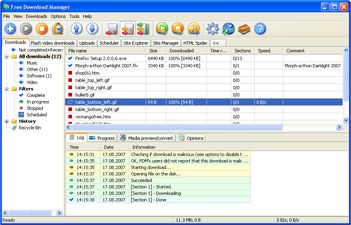
Internet Download Manager 1
Free Internet Download Manager downloads files and convert videos (including flash) faster with open-source Free Download Manager. Its features include integration with all browsers, support of downloads from RapidShare, BitTorrent support, adjusting traffic usage, resuming broken downloads. Free...
DOWNLOADSoftware Catalog
 Android Android |
Business & Productivity Tools |
| Desktop |
Developer Tools |
| Drivers |
Education |
| Games |
Home & Personal |
| Internet & Networking |
Multimedia & Design |
| Operating Systems |
Utilities |


ArtIcons Download
ArtIcons 5.27
ArtIcons provides great opportunities for working with Windows XP and Windows Vista icons. You will be able to handle Vista Icons with ease. In order to make Vista icons compatible with Windows XP you can save them without any compression.
Vista Icons introduce a new style of iconography that brings a higher level of detail and sophistication to Windows imagery. First, the style of Windows Aero-style icons is more realistic than illustrative, but not quite photorealistic. The icons are symbolic images - they should look better than photorealistic. Second, icons have a maximum size of 256 x 256, making them suitable for high-DPI displays. These high-resolution icons allow for high visual quality in list views with large icons. Finally, wherever practical, fixed document icons are replaced by thumbnails of the content, making documents easier to identify and find. Thus, ArtIcons is a beeline to refining the visuals of your program and making it more communicative for users.
A picture of a maximum size of 256 x 256 to be used as an icon, in principle, is supported by XP, yet such an icon occupies 400Kb of disk space, which is far more than standard 25Kb of an XP icon. Aha-Soft has again found a way to cast off these shackles: ArtIcons uses advanced PNG compression to save images without losses and supports semitransparent images with 8bit alpha channel. That technology reduces the size of an icon only, leaving the quality invariable.
ArtIcons will help you to obtain the modern Windows Vista look. All you need is just to redesign your program's most prominent icons to use the Aero-style. From this time onwards Vista Icons crafted by ArtIcons will strongly impact users' overall impression of your programs' visual design. ArtIcons will improve the usability of your software by making programs, objects, and actions easier to identify and find.
Size: 2.5 MB | Download Counter: 12
If ArtIcons download does not start please click this:
|
Can't download? Please inform us.
Related Software
 ArtIcons Pro - Find, extract, edit and create Windows icons in color depths up to 32-bit True Color. Import and export ICO, Vista ICO, CUR, BMP, JPG, PNG, PSD, WBMP, GIF images. Create and manage icon libraries. Create and store images with several layers.
 Icon Craft - Icon Craft is the ultimate icon maker for web and software developers. Easy to use and packed full of useful features, it also supports a very wide range of different formats.
 IconLover - Download icon editor to create Windows Vista icons, manage icon libraries, and import icons from various image formats. Save time using batch conversion operations. Enhance images using multi-layer design mode. Our icon software is made with love!
 IconCool Studio - An absolute solution to create, edit, convert, and extract Vista icons and 32-bit icons or cursors. The included Mixer creates custom icons from scratch by multiple layers and a variety of ready-to-use design elements.
 IconCool Editor - Powerful icon editor and cursor maker to edit icons, cursors and small web graphics. You can create icons from images of 25 formats or edit icons in exe, dll or icl. Supports 60 image filters, desktop capture, Vista icon editing and more.
 IconCool Manager - Icon extractor, icon library manager and a directory of 800 icon websites. An icon library with dozens of sample entries is included. You can view icons within files and save them in ICO, GIF, JPG, or convert images in 25 formats to icons.
 PC Icon Editor - PC Icon Editor is a powerful tool designed to Create, Edit and Manage Windows icons and Icon Library files as well
include XP icons . Ability to EXTRACT Windows icons from inside of applications and save them to Icons and Icon Library.
PC Icon Editor - PC Icon Editor is a powerful tool designed to Create, Edit and Manage Windows icons and Icon Library files as well
include XP icons . Ability to EXTRACT Windows icons from inside of applications and save them to Icons and Icon Library. Junior Icon Editor - This free icon editor allows to make multi-resolution icons in 16x16, 24x24, 32x32, 48x48 sizes, in monochrome, 16 colors, 256 colors and 32-bit True Color with alpha channel color depths. Modify your icons with helpful paint tools with easy!
 RV Icon Edit - The program RV Icon Edit makes fast and simply possible for you to create, edit, in and export of Icons and cursors. Application supports the Windows XP True color Icons.
 IconEdit2 - Create and edit your icons with easy-to-use TrueColor Icon Editor. IconEdit2 allows you to paint, search for icons in your files and capture screen areas. Supports 256x256 PNG-compressed Windows 7 icons. Allows creating multi-image icon files.
 Top Downloads
- Exe Icon Changer
- IconCool Studio
- ActivIcons
- PC Icon Extractor
- RV Icon Edit
- IconCool Editor
- Folder Icon Changer
- 533soft Icon Changer
- Junior Icon Editor
- ArtIcons Pro

New Downloads
- ArtIcons Pro
- Axialis IconWorkshop
- AWicons Pro
- Any to Icon
- Junior Icon Editor
- IconoMaker
- IconEdit2
- ArtIcons
- IconCool Studio
- IconCool Editor

New Reviews
- jZip Review
- License4J Review
- USB Secure Review
- iTestBot Review
- AbsoluteTelnet Telnet / SSH Client Review
- conaito VoIP SDK ActiveX Review
- conaito PPT2SWF SDK Review
- FastPictureViewer Review
- Ashkon MP3 Tag Editor Review
- Video Mobile Converter Review
Actual Software
| Link To Us
| Links
| Contact
Must Have
| TOP 100
| Authors
| Reviews
| RSS
| Submit


