




Recommended Software
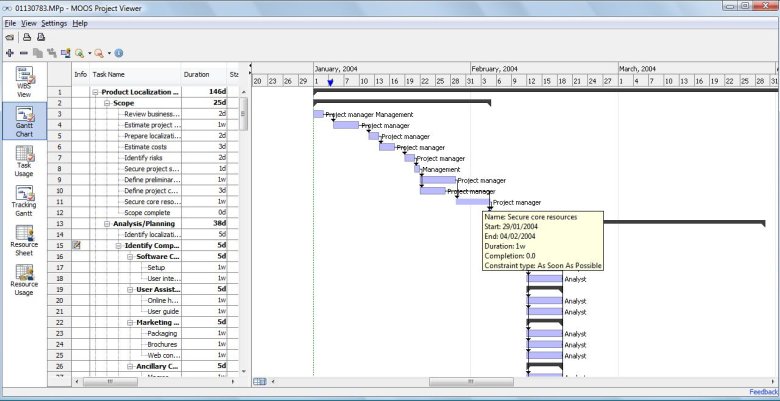
MS Project Viewer 2.8
MOOS Project Viewer is a Microsoft Project viewer that can open any MS Project file type (.mpp, .mpt, .mpx, .xml) for any Microsoft Project version (2000, 2003, 2007, 2010). Available views: WBS, Gantt chart, task sheet, resource sheet, resource usage, tracking Gantt. It is running on any Java...
DOWNLOADSoftware Catalog
 Android Android |
Business & Productivity Tools |
| Desktop |
Developer Tools |
| Drivers |
Education |
| Games |
Home & Personal |
| Internet & Networking |
Multimedia & Design |
| Operating Systems |
Utilities |


AnyToGif Download
AnyToGif 1.3
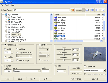
There are a lot of graphic editors. They are created for viewing and editing one image. What if you need to convert files of one format and work them up according to one scheme? What if you have dozens of files to be worked up? You will need months and months if you do it by means of usual graphic editor.
To make the process quick and fully automatic we suggest you using an optimized program for graphic work up of file groups.
Converter "AnyToGif" allows you to convert any image to gif-format and edit it by means of such function as rotating, stretch, crop, border, etc. It is easy to use and does not require any special skills. "AnyToGif" helps you to convert easily dozens of files and work them up according to one scheme using simple and quite understandable interface of the program.
"AnyToGif" supports basic graphic formats: GIF, BMP, JPEG, PCX, PSD, TIFF, etc.
This software is developed and tested under Windows 95/98/NT/2000/Xp operating systems.
Size: 1.2 MB | Download Counter: 3
If AnyToGif download does not start please click this:
Download Link 1
Can't download? Please inform us.
Related Software
 Magic Picture Converter - Magic Picture Converter converts digital photos and images in BMP, GIF and JPG formats to most popular web formats. The process is done in batch mode, which means that you can convert all the images in a folder just with one click.
 Picture Resize Genius - Picture Resize Genius includes the ability to batch resize pictures, batch resize photos, and perform batch image resize functions. Besides, it can add a text overlay (watermark), rename and more.
 AnyToJpeg - Converter "AnyToJpeg" allows you to convert any image to jpeg-format and edit it by means of such function as rotating, stretch, crop, border, etc. It is easy to use and does not require any special skills.
 Batch Picture Resizer - Resize images with a batch picture resizer easily and quickly. Batch Picture Resizer works with any number of photos, resizing them while preserving the best quality. This is perfect for making pictures more Internet friendly.
 Picture Resize - You need this photo resizer tool to easily convert, resize and optimize images. Easily resize, copy, paste into digital image editor. or resize save as and import into a web tool or word processor. Quickly batch resize images, great for websites.
 Web Pictures Downloader - WPD is an internet picture downloader to download pictures, photos, images, JPG, GIF from web or internet. It analyzes the web site, finds the pictures and photos (JPG,GIF) and downloads them to hard disk. It makes picture download a fun task.
- FotoMonster - FotoMonster is an internet picture downloader to download pictures, photos, images, JPG, GIF from web or internet. It accesses the target web site with a max. of 8 threads simultaneously. It can analyze the structure of the web site, download and...
 GSA Photo Manager - Selection of your favourite photos is a breeze, whether for organizing slide shows or simply for viewing and selecting photos. Make your choice quickly and targeted within an single scroll or switch to a multiple photo preview to make chose.
 Mytoolsoft Image Resizer - Mytoolsoft Image Resizer is a resize images software which was created to resize multiple images and convert format in batch mode. friendly user interface, quickly and easily.
 ImageConvert - ImageConvert is a small tool for converting all or several images from a directory from one picture format into another. You can convert into one format or into several fromat parallel. gif, png, ico, jpg, tiff, wmf, bmp or available.
 Top Downloads
- STP Viewer
- Inzomia viewer
- VMCPlayer
- Free DWG Viewer
- 3D Shell Extensions
- Neon Animated Cursors
- Thumbs.db Viewer
- Banner Maker Pro
- ACDSee Plugin - DeskTop Author
- Animated Inverse Cursor Scheme

New Downloads
- Expos
- AViCAD
- FURNIT
- RTOPO
- VMCPlayer
- AhaView
- Image Viewer Indepth
- VidShot Capturer
- SageThumbs
- FritzTv

New Reviews
- jZip Review
- License4J Review
- USB Secure Review
- iTestBot Review
- AbsoluteTelnet Telnet / SSH Client Review
- conaito VoIP SDK ActiveX Review
- conaito PPT2SWF SDK Review
- FastPictureViewer Review
- Ashkon MP3 Tag Editor Review
- Video Mobile Converter Review
Actual Software
| Link To Us
| Links
| Contact
Must Have
| TOP 100
| Authors
| Reviews
| RSS
| Submit


