




Recommended Software
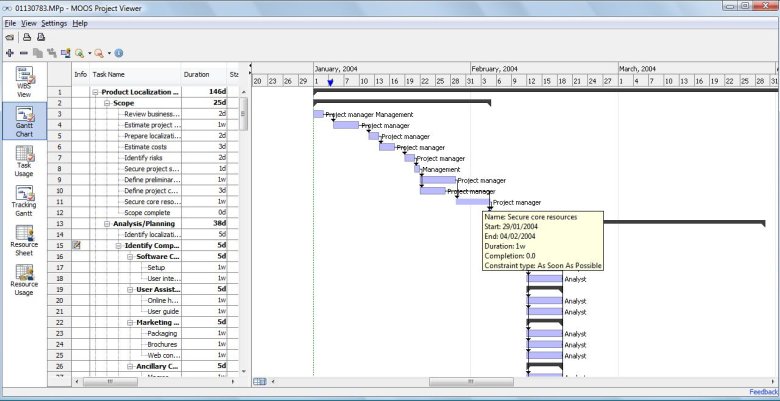
MS Project Viewer 2.8
MOOS Project Viewer is a Microsoft Project viewer that can open any MS Project file type (.mpp, .mpt, .mpx, .xml) for any Microsoft Project version (2000, 2003, 2007, 2010). Available views: WBS, Gantt chart, task sheet, resource sheet, resource usage, tracking Gantt. It is running on any Java...
DOWNLOADSoftware Catalog
 Android Android |
Business & Productivity Tools |
| Desktop |
Developer Tools |
| Drivers |
Education |
| Games |
Home & Personal |
| Internet & Networking |
Multimedia & Design |
| Operating Systems |
Utilities |


Any to Icon
Any to Icon 3.50
Category:
Utilities / Icon Tools
| Author: Aha-Soft
DOWNLOAD
GET FULL VER
Cost: $24.95 USD, 19.95 EUR
License: Shareware
Size: 5.3 MB
Download Counter: 35
Creating icons with Any to Icon Pro is remarkably easy and does not require any advanced knowledge of computers, or graphic design. The program offers you a wizard that guides you through all icon conversion stages in a point-and-click fashion. Simply select a file, or a folder with images, customize icon output settings that include icon size, color depth, transparency, and specify a destination folder. Based on these settings, the converter automatically produces an icon or a set of icons in a blink of an eye. For your convenience, Any to Icon Pro supports drag-and-drop for adding image files from Windows Explorer with a mouse.
Requirements: 32MB RAM, Pentium-233 MHz, 5MB HDD
OS Support:
Language Support:
Related Software
Bitmap To Icon | Convert | Convert Wbmp | Converter | Cursor wizard | Extract Bitmap | Gif | Image | Image Icon Converter V1. | Jpeg | Jpeg to bitmap | Jpeg wizard 1.3 | Jpeg wizard 2 | Jpg | Library | Picture | Tiff to bitmap | Tool | Utility | Wbmp utility
 Icon to Any - Icon to Any is an easy-to-use wizard that lets you convert Windows icons to images and cursors. This tool supports a great variety of graphic formats, and allows resizing, changing color depth and smoothing of output images.
 Icon Processor - Icon Processor is a must-have utility for every design enthusiast. It enables you to convert your favorite photos and images into nifty icons. You can use them to personalize your Windows desktop or give a professional touch to your software product.
 AIconExtract - AIconExtract is a 32-bit utility that was designed to allow you to easily extract icon, cursor and bitmap images from the files on your computer. Resource images can be copied to the clipboard or saved to disk as .ico, .bmp, .cur or .jpg images.
 AyeConvert - AyeConvert is a image converter, enables you to convert your bmp cur dcx emf fmf g3f g3n gif ico jpeg jpg j2k j2c jp2 jpc pcx pgx png pnm pgm ppm ras tif tiff wbmp wmf to bmp tiff jpeg png pcx dcx tga ras, etc.
 AhaView Free - This viewer supports all popular graphic formats, including JPEG, GIF, PNG, BMP, ICO, CUR, ANI, WBMP, PSD. You can browse images in thumbnail mode, view pictures full screen with zooming features, convert images to JPEG and Windows Bitmap formats.
 AyeView - AyeView is a graphics image viewer converter with image transformations, enables you to browse open view convert flip mirror rotate resize your bmp cur dcx emf gif ico jpeg jpg j2k j2c jp2 jpc pcx pgx png pnm pgm ppm ras tif tiff wbmp wmf raw images.
 2Wbmp - 2WBMP is a reliable batch graphics converter allowing you to convert images to wbmp format from 50 image file types. The program has no windows interface and processes multiple files at a time. With 2WBMP you can edit images before converting.
 IconForge Icon Editing Tool Kit - Complete suite for creating and modifying icons, multi-resolution icons, cursors and animated icons. Use for desktop icons, Web Site bookmarks, programs, other projects. Features: Full painting tools; Import or export images; Edit or add icons; more.
 Paint Express - Create, view, edit, and extract icons, cursors, and bitmaps. Convert existing images with transparency to Windows XP icon/cursor or to 32-bit bitmap with alpha channel in one-click. Capture and save any image from the desktop screen or from Internet.
 Able DXF Manager - View,acquire, convert and print DXF files in normal, batch and command line modes. Input formats: DXF, TIF, JPG, PCX, BMP, DIB, RLE, PNG, WMF, EMF, TGA, VDA, ICB, VST, PIX, PXM, PPM, PGM, ICO, CUR. Output: JPG, TIF, PCX, PNG, BMP, TGA, PXM, PPM.
 Top Downloads
- Exe Icon Changer
- IconCool Studio
- ActivIcons
- PC Icon Extractor
- RV Icon Edit
- IconCool Editor
- Folder Icon Changer
- 533soft Icon Changer
- Junior Icon Editor
- ArtIcons Pro

New Downloads
- ArtIcons Pro
- Axialis IconWorkshop
- AWicons Pro
- Any to Icon
- Junior Icon Editor
- IconoMaker
- IconEdit2
- ArtIcons
- IconCool Studio
- IconCool Editor

New Reviews
- jZip Review
- License4J Review
- USB Secure Review
- iTestBot Review
- AbsoluteTelnet Telnet / SSH Client Review
- conaito VoIP SDK ActiveX Review
- conaito PPT2SWF SDK Review
- FastPictureViewer Review
- Ashkon MP3 Tag Editor Review
- Video Mobile Converter Review
Actual Software
| Link To Us
| Links
| Contact
Must Have
| TOP 100
| Authors
| Reviews
| RSS
| Submit


